InsuraBook Developer Guide
Acknowledgements
This project is based on the AddressBook-Level3 project created by the SE-EDU initiative.
We would like to acknowledge the following third-party libraries and tools used in this project:
Libraries:
- JavaFX - Used for building the graphical user interface
- Jackson - Used for JSON parsing and data serialisation
- JUnit5 - Used as the testing framework
- Gradle - Used for build automation and dependency management
- Checkstyle - Used for code quality and style checking
- JaCoCo - Used for code coverage analysis
Documentation:
- PlantUML - Used for generating UML diagrams in documentation
Setting up, getting started
Refer to the guide Setting up and getting started.
Design
Architecture
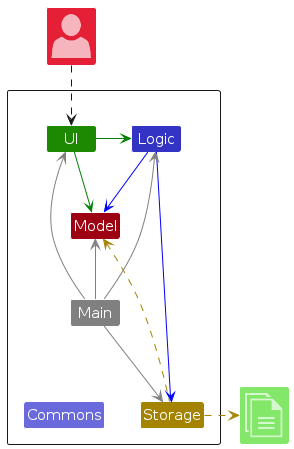
The Architecture Diagram given above explains the high-level design of the App.
Given below is a quick overview of main components and how they interact with each other.
Main components of the architecture
Main (consisting of classes Main and MainApp) is in charge of the app launch and shut down.
- At app launch, it initialises the other components in the correct sequence, and connects them up with each other.
- At shut down, it shuts down the other components and invokes cleanup methods where necessary.
The bulk of the app's work is done by the following four components:
UI: The UI of the App.Logic: The command executor.Model: Holds the data of the App in memory.Storage: Reads data from, and writes data to, the hard disk.
Commons represents a collection of classes used by multiple other components.
How the architecture components interact with each other
The Sequence Diagram below shows how the components interact with each other for the scenario where the user issues the command delete 1.
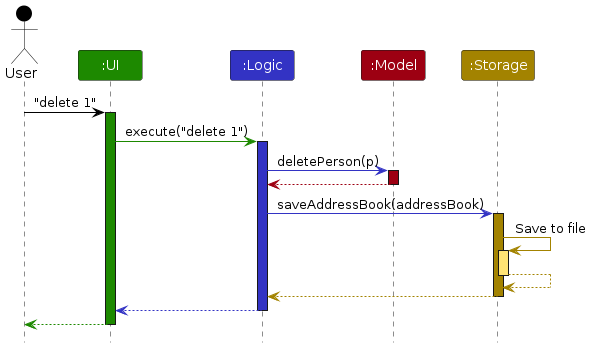
Each of the four main components (also shown in the diagram above),
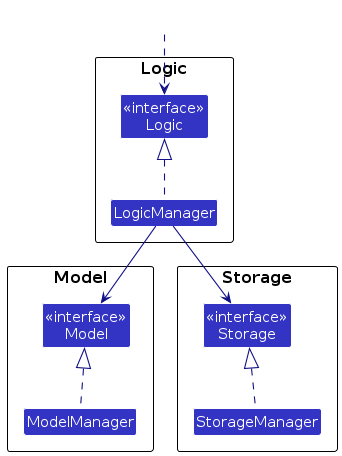
- defines its API in an
interfacewith the same name as the Component. - implements its functionality using a concrete
{Component Name}Managerclass (which follows the corresponding APIinterfacementioned in the previous point.
For example, the Logic component defines its API in the Logic.java interface and implements its functionality using the LogicManager.java class which follows the Logic interface. Other components interact with a given component through its interface rather than the concrete class (reason: to prevent outside component's being coupled to the implementation of a component), as illustrated in the (partial) class diagram below.
The sections below give more details of each component.
UI component
The API of this component is specified in Ui.java
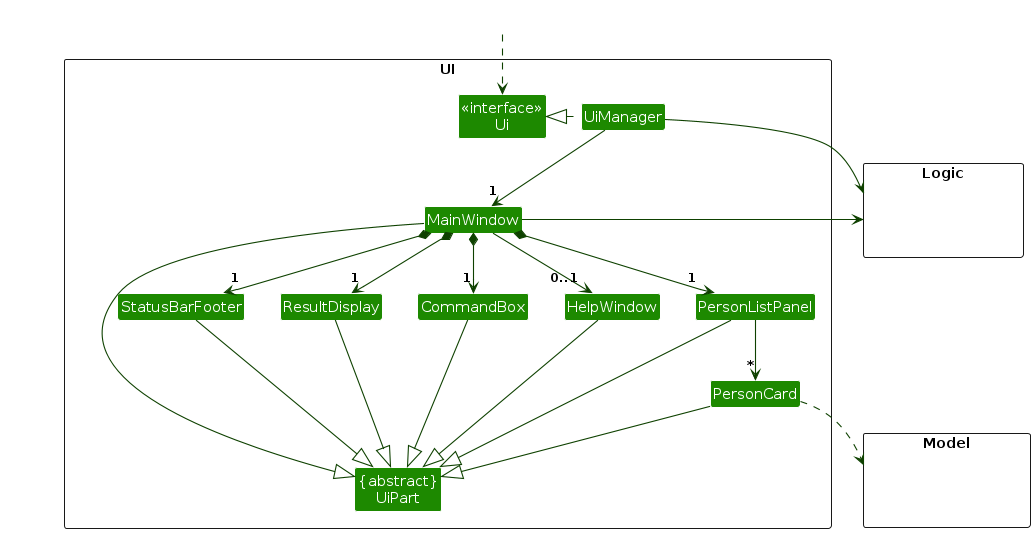
The UI consists of a MainWindow that is made up of parts e.g.CommandBox, ResultDisplay, PersonListPanel, StatusBarFooter etc. All these, including the MainWindow, inherit from the abstract UiPart class which captures the commonalities between classes that represent parts of the visible GUI.
The UI component uses the JavaFx UI framework. The layout of these UI parts are defined in matching .fxml files that are in the src/main/resources/view folder. For example, the layout of the MainWindow is specified in MainWindow.fxml
The UI component,
- executes user commands using the
Logiccomponent. - listens for changes to
Modeldata so that the UI can be updated with the modified data. - keeps a reference to the
Logiccomponent, because theUIrelies on theLogicto execute commands. - depends on some classes in the
Modelcomponent, as it displaysPersonobject residing in theModel.
Logic component
API : Logic.java
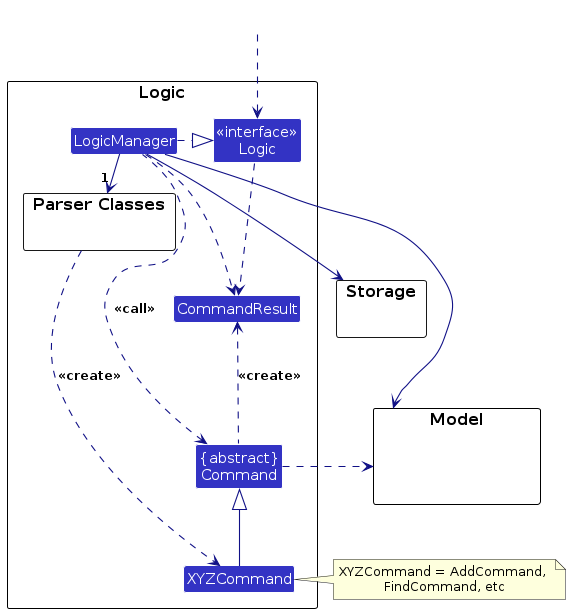
Here's a (partial) class diagram of the Logic component:
The sequence diagram below illustrates the interactions within the Logic component, taking execute("delete 1") API call as an example.
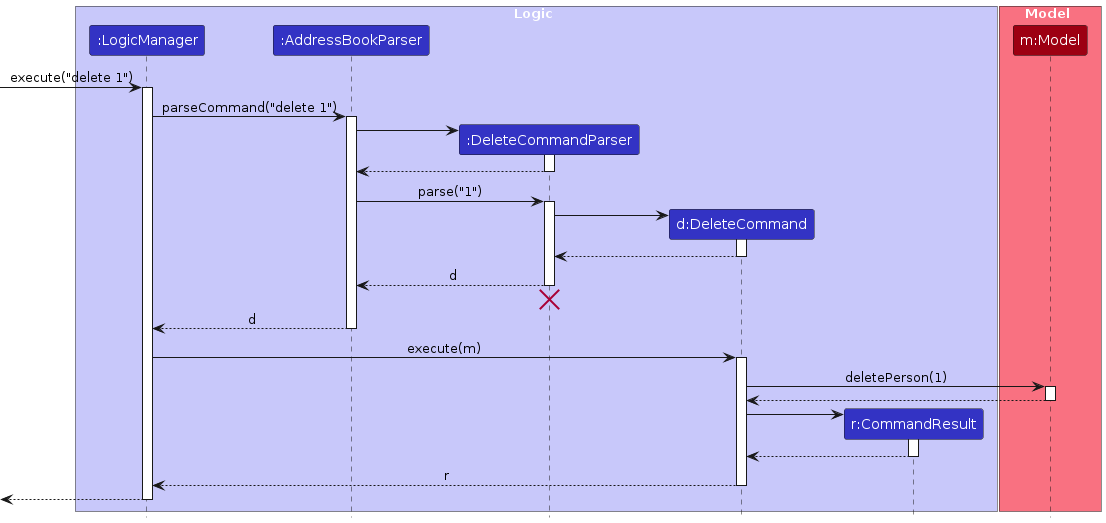
Note: The lifeline for DeleteCommandParser should end at the destroy marker (X) but due to a limitation of PlantUML, the lifeline continues till the end of diagram.
How the Logic component works:
- When
Logicis called upon to execute a command, it is passed to anAddressBookParserobject which in turn creates a parser that matches the command (e.g.,DeleteCommandParser) and uses it to parse the command. - This results in a
Commandobject (more precisely, an object of one of its subclasses e.g.,DeleteCommand) which is executed by theLogicManager. - The command can communicate with the
Modelwhen it is executed (e.g. to delete a person).
Note that although this is shown as a single step in the diagram above (for simplicity), in the code it can take several interactions (between the command object and theModel) to achieve. - The result of the command execution is encapsulated as a
CommandResultobject which is returned back fromLogic.
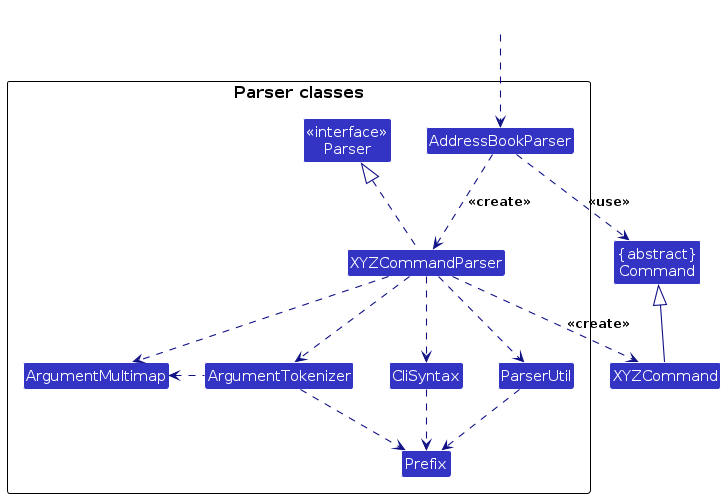
Here are the other classes in Logic (omitted from the class diagram above) that are used for parsing a user command:
How the parsing works:
- When called upon to parse a user command, the
AddressBookParserclass creates anXYZCommandParser(XYZis a placeholder for the specific command name e.g.,AddCommandParser) which uses the other classes shown above to parse the user command and create aXYZCommandobject (e.g.,AddCommand) which theAddressBookParserreturns back as aCommandobject. - All
XYZCommandParserclasses (e.g.,AddCommandParser,DeleteCommandParser, ...) inherit from theParserinterface so that they can be treated similarly where possible e.g, during testing.
Model component
API : Model.java
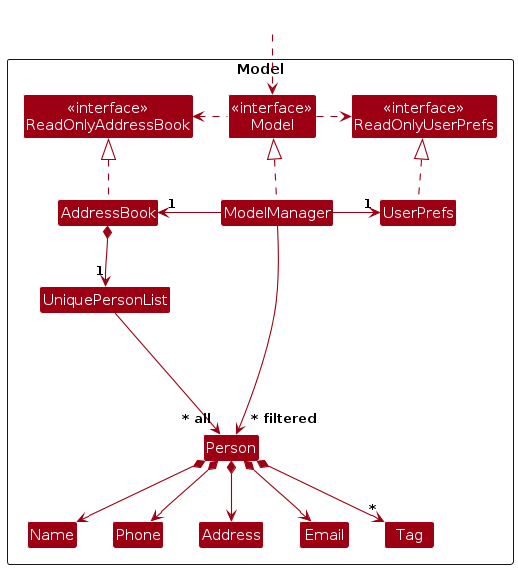
The Model component,
- stores the address book data i.e., all
Personobjects (which are contained in aUniquePersonListobject). - stores the currently 'selected'
Personobjects (e.g., results of a search query) as a separate filtered list which is exposed to outsiders as an unmodifiableObservableList<Person>that can be 'observed' e.g. the UI can be bound to this list so that the UI automatically updates when the data in the list change. - stores a
UserPrefobject that represents the user’s preferences. This is exposed to the outside as aReadOnlyUserPrefobjects. - does not depend on any of the other three components (as the
Modelrepresents data entities of the domain, they should make sense on their own without depending on other components)
Person Class
For a detailed view of the Person class and its associated attribute classes (Name, Phone, Email, etc.), refer to the dedicated diagram below:
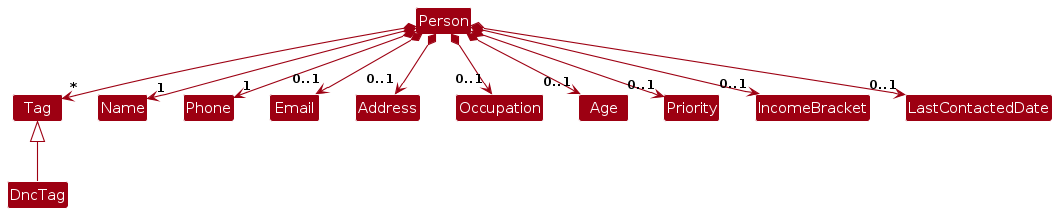
The Person class encapsulates all contact information for InsuraBook users. Key design decisions:
- Required Fields: Only Name and Phone are required fields. All other fields (Email, Address, Occupation, Age, Priority, Income Bracket, Tags) are optional.
- Validation: Each attribute class (Name, Phone, Email, etc.) performs its own validation upon construction.
- Editability: Person fields can be modified through the
editcommand, allowing users to update contact information as needed. - Tag Support: Persons can have multiple tags, including a special
DncTagfor "Do Not Call" compliance.
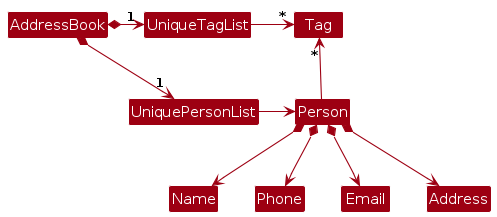
Note: An alternative (arguably, a more OOP) model is given below. It has a Tag list in the AddressBook, which Person references. This allows AddressBook to only require one Tag object per unique tag, instead of each Person needing their own Tag objects.
Storage component
API : Storage.java
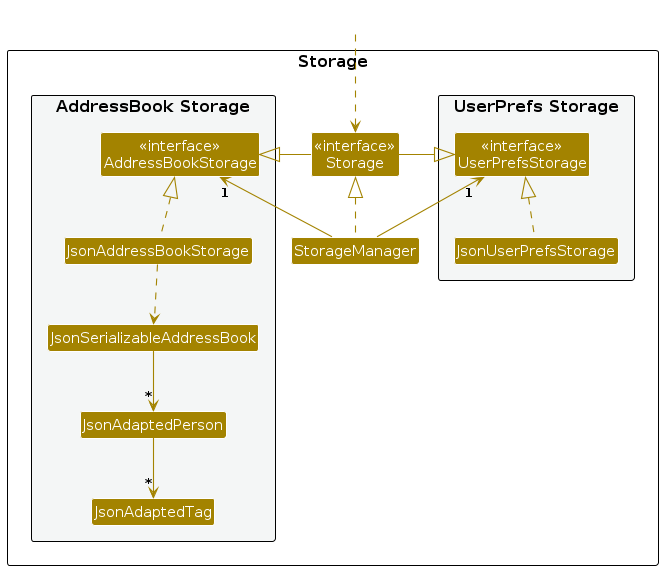
The Storage component,
- can save both address book data and user preference data in JSON format, and read them back into corresponding objects.
- inherits from both
AddressBookStorageandUserPrefStorage, which means it can be treated as either one (if only the functionality of only one is needed). - depends on some classes in the
Modelcomponent (because theStoragecomponent's job is to save/retrieve objects that belong to theModel) - uses Jackson-friendly adapter classes (
JsonAdaptedPerson,JsonAdaptedTag) to bridge between domain models and JSON representation
Common classes
Classes used by multiple components are in the seedu.address.commons package.
Implementation
This section describes some noteworthy details on how certain features are implemented.
[Proposed] Undo/redo feature
Proposed Implementation
The proposed undo/redo mechanism is facilitated by VersionedAddressBook. It extends AddressBook with an undo/redo history, stored internally as an addressBookStateList and currentStatePointer. Additionally, it implements the following operations:
VersionedAddressBook#commit()— Saves the current address book state in its history.VersionedAddressBook#undo()— Restores the previous address book state from its history.VersionedAddressBook#redo()— Restores a previously undone address book state from its history.
These operations are exposed in the Model interface as Model#commitAddressBook(), Model#undoAddressBook() and Model#redoAddressBook() respectively.
Given below is an example usage scenario and how the undo/redo mechanism behaves at each step.
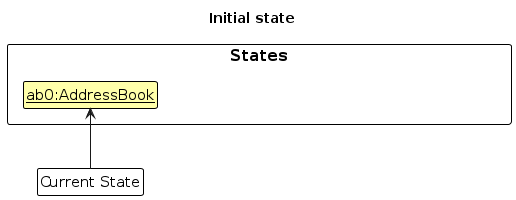
Step 1. The user launches the application for the first time. The VersionedAddressBook will be initialised with the initial address book state, and the currentStatePointer pointing to that single address book state.
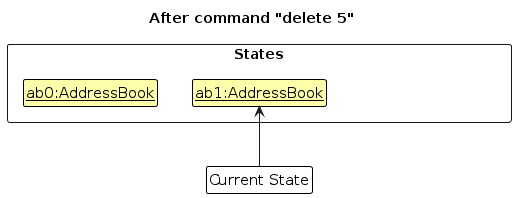
Step 2. The user executes delete 5 command to delete the 5th person in the address book. The delete command calls Model#commitAddressBook(), causing the modified state of the address book after the delete 5 command executes to be saved in the addressBookStateList, and the currentStatePointer is shifted to the newly inserted address book state.
Step 3. The user executes add n/David … to add a new person. The add command also calls Model#commitAddressBook(), causing another modified address book state to be saved into the addressBookStateList.
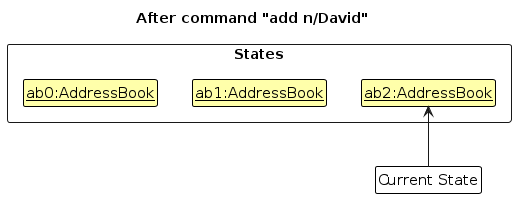
Note: If a command fails its execution, it will not call Model#commitAddressBook(), so the address book state will not be saved into the addressBookStateList.
Step 4. The user now decides that adding the person was a mistake, and decides to undo that action by executing the undo command. The undo command will call Model#undoAddressBook(), which will shift the currentStatePointer once to the left, pointing it to the previous address book state, and restores the address book to that state.
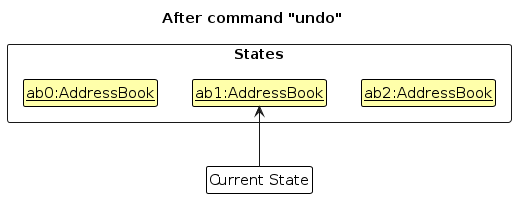
Note: If the currentStatePointer is at index 0, pointing to the initial AddressBook state, then there are no previous AddressBook states to restore. The undo command uses Model#canUndoAddressBook() to check if this is the case. If so, it will return an error to the user rather
than attempting to perform the undo.
The following sequence diagram shows how an undo operation goes through the Logic component:
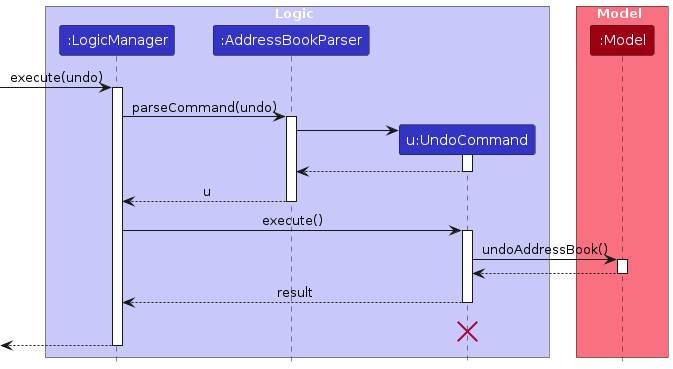
Note: The lifeline for UndoCommand should end at the destroy marker (X) but due to a limitation of PlantUML, the lifeline reaches the end of diagram.
Similarly, how an undo operation goes through the Model component is shown below:
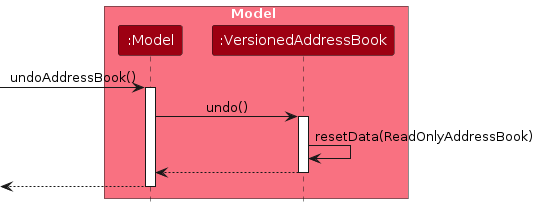
The redo command does the opposite — it calls Model#redoAddressBook(), which shifts the currentStatePointer once to the right, pointing to the previously undone state, and restores the address book to that state.
Note: If the currentStatePointer is at index addressBookStateList.size() - 1, pointing to the latest address book state, then there are no undone AddressBook states to restore. The redo command uses Model#canRedoAddressBook() to check if this is the case. If so, it will return an error to the user rather than attempting to perform the redo.
Step 5. The user then decides to execute the command list. Commands that do not modify the address book, such as list, will usually not call Model#commitAddressBook(), Model#undoAddressBook() or Model#redoAddressBook(). Thus, the addressBookStateList remains unchanged.
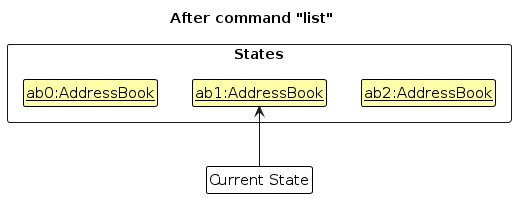
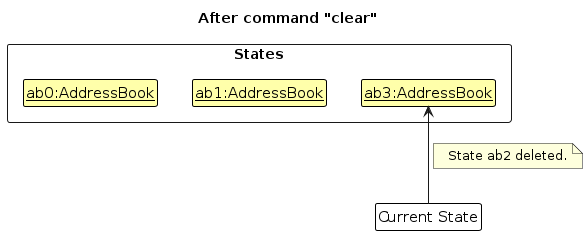
Step 6. The user executes clear, which calls Model#commitAddressBook(). Since the currentStatePointer is not pointing at the end of the addressBookStateList, all address book states after the currentStatePointer will be purged. Reason: It no longer makes sense to redo the add n/David … command. This is the behavior that most modern desktop applications follow.
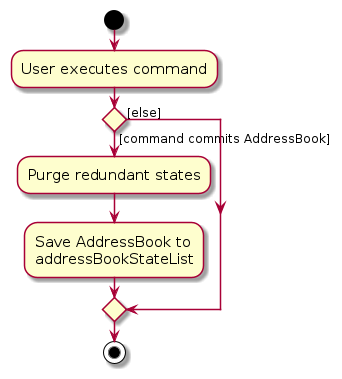
The following activity diagram summarises what happens when a user executes a new command:
Design considerations:
Aspect: How undo & redo executes:
Alternative 1 (current choice): Saves the entire address book.
- Pros: Easy to implement.
- Cons: May have performance issues in terms of memory usage.
Alternative 2: Individual command knows how to undo/redo by itself.
- Pros: Will use less memory (e.g. for
delete, just save the person being deleted). - Cons: We must ensure that the implementation of each individual command are correct.
- Pros: Will use less memory (e.g. for
Documentation, logging, testing, configuration, dev-ops
Appendix: Requirements
Product scope
Target user profile:
- busy telemarketing agents who sell insurance
- need to manage large lists of clients and new leads
- require quick access to client names, phone numbers, and other essential information during calls
- prefer desktop apps over other types
- can type fast and are reasonably comfortable using CLI apps
- need to find, add, and update records efficiently without interrupting their workflow
Value proposition:
- saves time
- prevent lost information
- ensures timely follow-ups
- streamlines management
User stories
Priorities: High (must have) - * * *, Medium (nice to have) - * *, Low (unlikely to have) - *
| Priority | As a … | I want to … | So that I can… |
|---|---|---|---|
* * * | telemarketing agent | filter contacts by tags, demographics, priority, or status | create targeted campaigns |
* * * | telemarketing agent | import contacts from CSV/Excel/raw text files | save time entering bulk data |
* * * | telemarketing agent | add a new contact with a customer’s name and phone number | |
* * * | telemarketing agent | tag contacts (e.g., “interested,” “follow-up,” “do not call”) | segment my leads |
* * * | telemarketing agent | search for a contact by name, number, or tag | quickly retrieve their details |
* * * | telemarketing agent | edit a contact’s details | |
* * * | telemarketing agent | prioritise contacts (high, medium, low) | focus on the most promising leads |
* * * | telemarketing agent | mark contacts as “Do Not Call” | comply with regulations |
* * * | telemarketing agent | delete outdated or duplicate contacts | keep my address book clean |
* * * | telemarketing agent | record a contact’s age, occupation, and income bracket | match them to suitable insurance products |
* * * | telemarketing agent | see the last contact date for each lead | know when to follow up |
* * * | team leader | assign leads to different agents | workload is distributed fairly |
* * | team leader | view the call notes of my team members | track progress |
* * | telemarketing agent | store multiple phone numbers and emails per contact | reach them through different channels |
* * | telemarketing agent | log existing insurance policies a contact already has | avoid pitching irrelevant products |
* * | telemarketing agent | sort contacts by last contacted date or priority | plan my day’s calls |
* * | telemarketing agent | bookmark or star important contacts | access them quickly |
* * | telemarketing agent | securely store sensitive customer information | avoid data leaks |
* * | telemarketing agent | quickly remove all personal data of a contact upon request | respect privacy rights |
* * | telemarketing agent | view the number of follow-ups pending | manage my workload |
* | team leader | reassign contacts from one agent to another | ensure no lead is neglected if someone is unavailable |
* | team leader | see a summary dashboard of call outcomes | evaluate team performance |
* | telemarketing agent | note important dates such as policy renewal or birthday | time my calls effectively |
* | telemarketing agent | record notes after each call | avoid forgetting what was discussed |
* | telemarketing agent | schedule follow-up reminders | never miss important calls |
* | telemarketing agent | export selected contacts into a call list | use them with auto-dialer tools |
* | telemarketing agent | log when I obtained consent to contact someone | prove compliance if needed |
* | telemarketing agent | track my call success rate | monitor my personal performance |
* | telemarketing agent | see which products generate the most interest among leads | guide my focus |
* | telemarketing agent | generate a weekly report of my calls and outcomes | share progress with my supervisor |
Use cases
UC1 - Delete a Person
Use case: UC1 - Delete a Person
Actor: User
MSS:
   1.  User requests to list persons
   2.  InsuraBook shows a list of persons
   3.  User requests to delete a specific person in the list
   4.  InsuraBook deletes the person
   Use case ends.

Extensions:
   2a. The list is empty.
   Use case ends.

   3a. The given index is invalid.
      3a1. InsuraBook shows an error message.
      Use case resumes at step 2.
UC2 - Add New Contact
Use case: UC2 - Add New Contact
Actor: User
MSS:
   1.  User requests to add a new contact with details (name, phone, email, etc.)
   2.  InsuraBook validates the contact information
   3.  InsuraBook adds the contact to the list
   4.  InsuraBook displays success message with contact details
   Use case ends.

Extensions:
   2a. Required fields are missing.
      2a1. InsuraBook shows an error message indicating missing fields.
      Use case ends.

   2b. Phone number format is invalid.
      2b1. InsuraBook shows an error message about invalid phone format.
      Use case ends.

   2c. Email format is invalid.
      2c1. InsuraBook shows an error message about invalid email format.
      Use case ends.

   2d. Contact with same name and phone already exists.
      2d1. InsuraBook shows an error message about duplicate contact.
      Use case ends.
UC3 - Edit Contact Details
Use case: UC3 - Edit Contact Details
Actor: User
MSS:
   1.  User requests to list persons
   2.  InsuraBook shows a list of persons
   3.  User requests to edit a specific person's details with new information
   4.  InsuraBook validates the new information
   5.  InsuraBook updates the contact details
   6.  InsuraBook displays success message with updated details
   Use case ends.

Extensions:
   2a. The list is empty.
   Use case ends.

   3a. The given index is invalid.
      3a1. InsuraBook shows an error message.
      Use case resumes at step 2.

   4a. New information format is invalid.
      4a1. InsuraBook shows an error message indicating invalid format.
      Use case resumes at step 3.

   4b. Edited contact would become a duplicate of an existing contact.
      4b1. InsuraBook shows an error message about duplicate contact.
      Use case resumes at step 3.
UC4 - Find Contacts by Keywords
Use case: UC4 - Find Contacts by Keywords
Actor: User
MSS:
   1.  User requests to find contacts using search keywords
   2.  InsuraBook searches for matching contacts by name
   3.  InsuraBook displays a list of matching contacts
   Use case ends.

Extensions:
   1a. No keywords provided.
      1a1. InsuraBook shows an error message about missing keywords.
      Use case ends.

   3a. No contacts match the search criteria.
      3a1. InsuraBook displays an empty list with a message indicating no matches.
      Use case ends.
UC5 - Tag a Contact
Use case: UC5 - Tag a Contact
Actor: User
MSS:
   1.  User requests to list persons
   2.  InsuraBook shows a list of persons
   3.  User requests to add tags to a specific person
   4.  InsuraBook validates the tag format
   5.  InsuraBook adds the tags to the contact
   6.  InsuraBook displays success message with updated contact
   Use case ends.

Extensions:
   2a. The list is empty.
   Use case ends.

   3a. The given index is invalid.
      3a1. InsuraBook shows an error message.
      Use case resumes at step 2.

   4a. Tag format is invalid (e.g., contains special characters).
      4a1. InsuraBook shows an error message about invalid tag format.
      Use case resumes at step 3.
UC6 - Set Contact Priority
Use case: UC6 - Set Contact Priority
Actor: User
MSS:
   1.  User requests to list persons
   2.  InsuraBook shows a list of persons
   3.  User requests to set priority for a specific person (HIGH, MEDIUM, or LOW)
   4.  InsuraBook validates the priority value
   5.  InsuraBook updates the contact's priority
   6.  InsuraBook displays success message with updated priority
   Use case ends.

Extensions:
   2a. The list is empty.
   Use case ends.

   3a. The given index is invalid.
      3a1. InsuraBook shows an error message.
      Use case resumes at step 2.

   4a. Priority value is invalid.
      4a1. InsuraBook shows an error message indicating valid priority levels.
      Use case resumes at step 3.
Non-Functional Requirements
Technical Requirements
- Should work on any mainstream OS as long as it has Java
17or above installed. - Should work without requiring an installer or any additional software installation beyond Java.
- Should function offline without requiring an internet connection for core features.
Usability Requirements
- A user with above average typing speed for regular English text (i.e. not code, not system admin commands) should be able to accomplish most of the tasks faster using commands than using the mouse.
- The system should be usable by telemarketing agents who are novice users of CLI applications, with minimal training required.
- Error messages should be clear and provide actionable guidance to help users correct their inputs.
- The user interface should remain responsive and not freeze during operations.
Reliability and Data Integrity
- Should not lose any data during normal operations or graceful shutdowns.
- Should automatically save data after each modification to prevent data loss.
- Should provide data validation to prevent corruption of the contact database.
- Should handle corrupted data files gracefully by alerting the user rather than crashing.
Scalability Requirements
- Should maintain performance even when the database grows from 100 to 1000 contacts.
- Sorting and filtering operations should scale linearly with the number of contacts.
Portability Requirements
- Should store data in a human-editable text format (JSON) for easy portability and backup.
- Should be able to run from any directory without requiring installation to a specific location.
- Data files should be portable across different operating systems without modification.
Compliance and Privacy Requirements
- Should provide a "Do Not Call" (DNC) feature to comply with telemarketing regulations.
Documentation Requirements
- Should provide comprehensive user documentation covering all features and commands.
- Should include example commands and use cases in the user guide for common tasks.
- Developer documentation should be sufficient for new developers to set up and contribute to the project.
Constraints
- The project should be completed within the semester timeline with regular iterative releases.
- The system should work without requiring elevated permissions or administrator rights.
- Should not use any paid third-party libraries or services.
Quality Requirements
- The user interface should be intuitive enough that common tasks can be performed without referring to documentation.
- Command syntax should be consistent across all features to reduce learning curve.
Glossary
- CLI: Command Line Interface - a text-based interface where users type commands to interact with the application
- DNC: Do Not Call - a regulatory compliance feature that marks contacts who should not be contacted for telemarketing
- GUI: Graphical User Interface - a visual interface that allows users to interact through graphical elements
- JavaFX: A Java library used for creating desktop applications with graphical user interfaces
- JSON: JavaScript Object Notation - a lightweight data format used for storing and exchanging data
- Mainstream OS: Windows, Linux, Unix, MacOS
Appendix: Instructions for manual testing
Given below are instructions to test the app manually.
Note: These instructions only provide a starting point for testers to work on; testers are expected to do more exploratory testing.
Launch and shutdown
Test: Initial launch
Preconditions: Java 17 is installed on the system.
- Download the jar file and copy into an empty folder.
- Open a command terminal and navigate to the folder containing the jar file. Run the command
java -jar InsuraBook.jar.
Expected: Shows the GUI with a set of sample contacts. The window size may not be optimum.
Test: Saving window preferences
Preconditions: Application has been launched at least once.
- Resize the window to an optimum size and move the window to a different location.
- Close the window.
- Re-launch the app by running
java -jar InsuraBook.jarin the command terminal.
Expected: The most recent window size and location is retained.
Test: Graceful shutdown
Preconditions: Application is running with some contacts added.
- Add or modify some contacts.
- Close the application using the window's close button (X).
- Re-launch the application.
Expected: All changes are persisted and displayed when relaunching.
Test: Exit command
Preconditions: Application is running.
- Type
exitin the command box. - Press Enter.
Expected: Application closes gracefully.
Adding a contact
Test: Adding a contact with all fields
Preconditions: Application is running.
- Execute
add n/John Doe p/98765432 e/johnd@example.com a/123 Main St o/Engineer age/30 pr/HIGH i/UPPER t/friend t/colleague.
Expected: New contact "John Doe" is added with all specified fields. Success message displayed with contact details.
Test: Adding a contact with only required fields
Preconditions: Application is running.
- Execute
add n/Jane Smith p/87654321 e/janes@example.com a/456 Second Ave.
Expected: New contact "Jane Smith" is added. Optional fields (occupation, age, priority, income bracket) use default values.
Test: Adding a contact with duplicate name and phone
Preconditions: Contact "Alice Tan" with phone "91234567" already exists.
- Execute
add n/Alice Tan p/91234567 e/different@email.com a/Different Address.
Expected: Error message: "This person already exists in the address book."
Test: Adding a contact with invalid phone number
Preconditions: Application is running.
- Execute
add n/Bob Lee p/123 e/bob@example.com a/789 Third St.
Expected: Error message about invalid phone number format.
Test: Adding a contact with invalid email
Preconditions: Application is running.
- Execute
add n/Charlie Brown p/98765432 e/invalid-email a/101 Fourth Ave.
Expected: Error message about invalid email format.
Test: Adding a contact with missing required fields
Preconditions: Application is running.
- Execute
add n/David Lee.
Expected: Error message indicating missing required field (phone number).
Editing a contact
Test: Editing a contact's name
Preconditions: List has at least one contact.
- Execute
edit 1 n/New Name.
Expected: First contact's name is changed to "New Name". Success message displayed.
Test: Editing multiple fields
Preconditions: List has at least one contact.
- Execute
edit 1 p/99998888 e/newemail@example.com pr/HIGH.
Expected: First contact's phone, email, and priority are updated. Success message displayed.
Test: Editing with invalid index
Preconditions: List has N contacts.
- Execute
edit 999 n/Test(where 999 > N).
Expected: Error message: "The person index provided is invalid."
Test: Editing to create duplicate
Preconditions: Two contacts exist: "Alice" with phone "91111111" and "Bob" with phone "92222222".
- Execute
edit 2 n/Alice p/91111111.
Expected: Error message: "A person with this name and phone number already exists in the InsuraBook.
Test: Editing tags
Preconditions: First contact has existing tags.
- Execute
edit 1 t/newTag.
Expected: First contact's tags are replaced with only "newTag". Previous tags removed.
Test: Clearing all tags
Preconditions: First contact has existing tags.
- Execute
edit 1 t/.
Expected: All tags removed from first contact.
Deleting a contact
Test: Deleting a contact while all contacts are being shown
Preconditions: List all contacts using the list command. Multiple contacts in the list.
- Execute
delete 1.
Expected: First contact is deleted from the list. Details of the deleted contact shown in the message box.
Test: Delete with invalid index zero
Preconditions: List all contacts using the list command. Multiple contacts in the list.
- Execute
delete 0.
Expected: No contact is deleted. Error message: "Invalid command format! Index must be a positive integer."
Test: Delete with negative index
Preconditions: List all contacts using the list command. Multiple contacts in the list.
- Execute
delete -1.
Expected: No contact is deleted. Error message shown indicating invalid index.
Test: Delete with out-of-bounds index
Preconditions: List all contacts using the list command. Multiple contacts in the list.
- Execute
delete 999(where 999 is larger than the list size).
Expected: No contact is deleted. Error message: "The person index provided is invalid."
Test: Delete without index
Preconditions: Application is running.
- Execute
delete.
Expected: No contact is deleted. Error message about invalid command format shown.
Test: Delete with non-numeric index
Preconditions: Application is running.
- Execute
delete abc.
Expected: No contact is deleted. Error message about invalid command format shown.
Test: Deleting from filtered list
Preconditions: Use find command to filter the list (e.g., find Alice).
- Note the contacts shown in the filtered list.
- Execute
delete 1.
Expected: First contact in the filtered list is deleted, not necessarily the first in the full list.
Test: Deleting last contact in list
Preconditions: List has at least one contact. Note the size of the list.
- Execute
delete Nwhere N is the size of the list.
Expected: Last contact is deleted successfully. List size decreases by one.
Finding contacts
Test: Finding by name
Preconditions: Contact list contains "Alice Tan" and "Bob Lee".
- Execute
find Alice.
Expected: Only "Alice Tan" is shown in the filtered list.
Test: Finding by phone number
Preconditions: Contact list contains contact with phone number "91234567".
- Execute
find 91234567.
Expected: Contact(s) with phone number containing "91234567" are shown in the filtered list.
Test: Finding by occupation
Preconditions: Contact list contains contacts with occupation "Engineer".
- Execute
find Engineer.
Expected: All contacts with occupation containing "Engineer" are shown in the filtered list.
Test: Finding by tags
Preconditions: Contact list contains contacts with tag "friend".
- Execute
find friend.
Expected: All contacts tagged with "friend" are shown in the filtered list.
Test: Finding by multiple keywords
Preconditions: Contact list contains "Alice Tan" (Engineer), "Alice Wong" (Doctor), and "Bob Lee" (Engineer).
- Execute
find Alice Bob.
Expected: "Alice Tan", "Alice Wong", and "Bob Lee" are shown.
Test: Case-insensitive search
Preconditions: Contact list contains "Alice Tan".
- Execute
find alice.
Expected: "Alice Tan" is found and displayed.
Test: Finding with no matches
Preconditions: Application is running with contacts.
- Execute
find NonexistentName.
Expected: Empty list displayed with message "0 persons listed!"
Test: Finding without keywords
Preconditions: Application is running.
- Execute
find.
Expected: Error message about invalid command format.
Test: Returning to full list after find
Preconditions: A find operation has filtered the list.
- Execute
list.
Expected: Full contact list is displayed again.
Priority management
Test: Setting priority to HIGH
Preconditions: List has at least one contact.
- Execute
edit 1 pr/HIGH.
Expected: First contact's priority is set to HIGH. Priority indicator updated in display.
Test: Setting priority to MEDIUM
Preconditions: List has at least one contact.
- Execute
edit 1 pr/MEDIUM.
Expected: First contact's priority is set to MEDIUM.
Test: Setting priority to LOW
Preconditions: List has at least one contact.
- Execute
edit 1 pr/LOW.
Expected: First contact's priority is set to LOW.
Test: Setting invalid priority
Preconditions: List has at least one contact.
- Execute
edit 1 pr/URGENT.
Expected: Error message about invalid priority value. Valid values shown.
Income bracket management
Test: Setting income bracket
Preconditions: List has at least one contact.
- Execute
edit 1 i/HIGH.
Expected: First contact's income bracket is set to HIGH.
Test: Testing all income bracket levels
Preconditions: List has at least one contact.
- Execute each command:
edit 1 i/LOW,edit 1 i/MIDDLE,edit 1 i/HIGH.
Expected: Each command successfully updates the income bracket.
Test: Setting invalid income bracket
Preconditions: List has at least one contact.
- Execute
edit 1 i/RICH.
Expected: Error message about invalid income bracket. Valid values shown.
Do Not Call (DNC) tag management
Test: Adding DNC tag
Preconditions: First contact does not have DNC tag.
- Execute
dnc 1.
Expected: Contact is marked with DNC indicator. Special visual indication shown.
Test: Attempting to modify contact with DNC tag
Preconditions: First contact has DNC tag.
- Execute
edit 1 t/to attempt removing tags, oredit 1 n/New Nameto attempt modifying any field.
Expected: Error message: "Cannot modify fields of a Do Not Call contact." Contact remains unchanged.
Test: DNC tag persistence
Preconditions: Contact with DNC tag exists.
- Close and relaunch application.
Expected: DNC tag and indicator persist across sessions.
Saving data
Test: Dealing with missing data files
Preconditions: Application has been run at least once with data saved.
- Close the application.
- Navigate to the data folder and delete
insurabook.json. - Relaunch the application.
Expected: Application starts with sample data loaded. No error messages displayed.
Test: Dealing with corrupted data files
Preconditions: Application has been run at least once with data saved.
- Close the application.
- Navigate to the data folder and open
insurabook.jsonin a text editor. - Corrupt the file by removing a closing brace
}or adding invalid JSON. - Save the file and relaunch the application.
Expected: Application starts with an empty contact list. Warning message is logged in the console indicating that the corrupted data file could not be loaded and will be starting with an empty contact list.
Test: Data persistence after adding contacts
Preconditions: Application is running.
- Add a new contact using
add n/Test Person p/91234567 e/test@example.com a/123 Test St. - Close the application without using any save command.
- Relaunch the application.
Expected: The newly added contact "Test Person" appears in the contact list.
Test: Data persistence after editing contacts
Preconditions: Application is running with at least one contact.
- Edit an existing contact using
edit 1 n/New Name. - Close the application.
- Relaunch the application.
Expected: The edited contact shows "New Name" as the name.
Test: Data file location
Preconditions: Application has been run at least once.
- Close the application.
- Navigate to the application folder.
- Check for
data/insurabook.jsonfile.
Expected: File exists at [JAR location]/data/insurabook.json and is readable JSON.
Appendix: Planned Enhancements
Team size: 5
Allow multiple phone number fields with international format support: Currently, the phone number field only accepts numeric digits and each contact can have only one phone number. However, telemarketers frequently need to store multiple contact numbers (home, mobile, office) for the same person and require support for special characters like
-,+, and( )to accommodate international country codes and phone extensions.Add confirmation dialog for clear command: Currently, the
clearcommand immediately deletes all contacts from InsuraBook without requesting user confirmation. A single typo or accidental command execution can permanently delete an insurance agent's entire client database. Although data is saved to file after each operation, there is no recovery mechanism to restore cleared contacts. This poses a significant risk for professionals managing hundreds of client records. To address this, we plan to implement a confirmation dialog that requires the user to explicitly confirm the action before deletion proceeds.Reduce restriction on DNC feature: Currently, the "Do Not Call" (DNC) feature prevents editing any field of contacts tagged with DNC, including non-call-related information like address or occupation. For example, if a client with a DNC tag moves, the agent cannot update the address without removing the DNC tag first. To address this, we plan to reduce the restrictions to only prevent editing of name and phone number fields, while allowing updates to other contact information. We also plan to add a dedicated reversal command to eliminate the need to delete/re-add workaround.
Provide in-app command reference for help command: Currently, the
helpcommand only directs users to an external online User Guide link, forcing CLI users to interrupt their workflow, open a web browser, and manually navigate documentation simply to recall a command format. This lack of in-app reference significantly hinders the efficiency and usability for fast-typists and power users who value staying within the terminal environment. To address this, we plan to update thehelpcommand to display a brief summary of all available commands and their basic syntax directly in the application. The external User Guide link can be retained as a secondary option for users needing more comprehensive details.Improve Unicode character support for international contacts: Currently, the application handles Unicode characters inconsistently across different fields. The TAG field is limited to alphanumeric characters and spaces, while the EMAIL field only accepts standard ASCII characters, preventing agents from working with clients who use internationalised email addresses with native scripts (e.g., Chinese, Arabic). This creates barriers for telemarketing agents with diverse, multilingual client bases. To address this, we plan to extend the TAG field to accept all Unicode characters and extend the EMAIL field to support internationalised email addresses with foreign characters, while maintaining current restrictions for NAME and other fields to ensure data consistency.